Your shopping list,
already priced.
Build a shared list from products you have bought before. Lumy uses the prices on your own receipts to estimate the total before you get to the till.
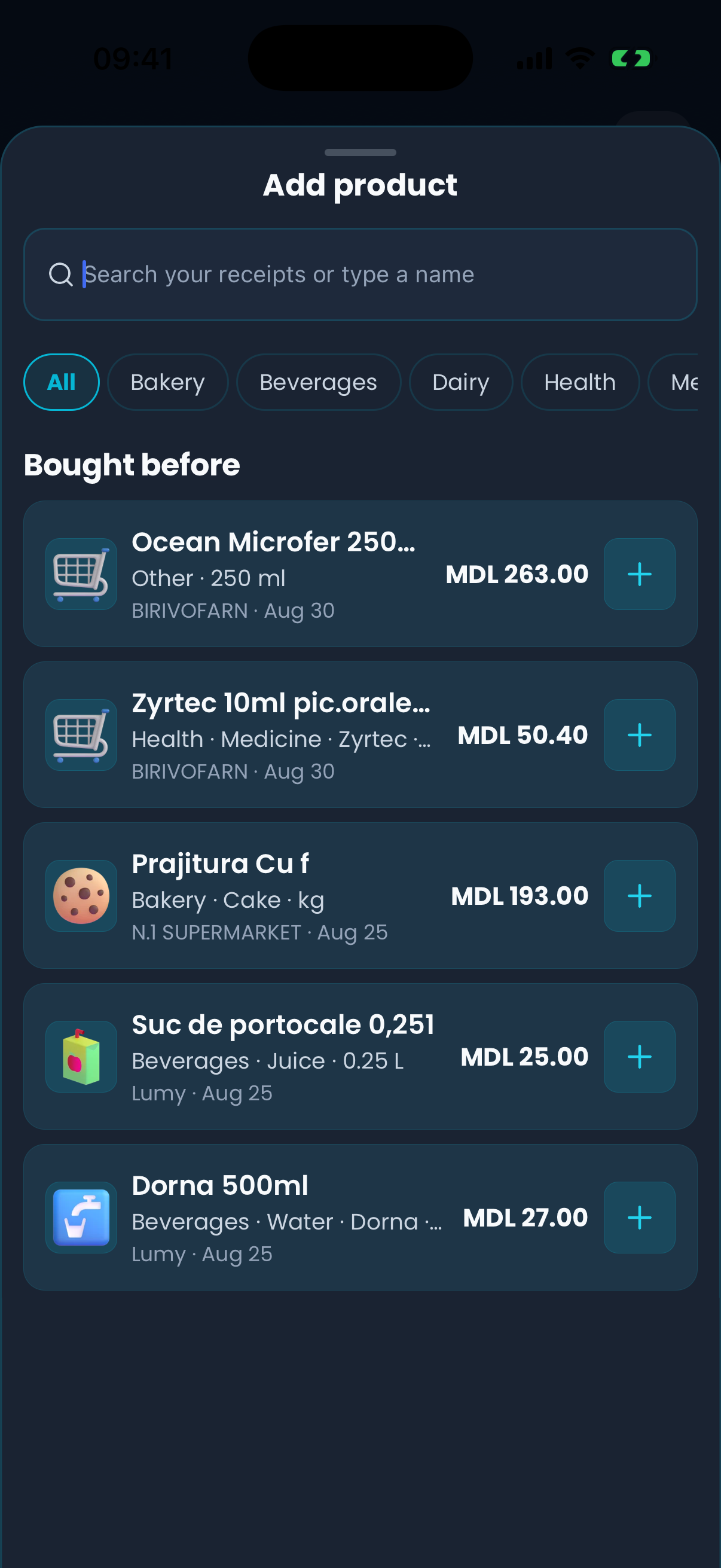


From one receipt to the next shopping list
Each scan makes the next list better. That is the whole loop.
01
Scan a receipt
Photograph the receipt in chat and Lumy reads the merchant, the total and the individual product lines.
02
Products get a price
Every recognised line joins your own product history with the price, quantity and unit you actually paid.
03
Build the list
"Add product" searches those products first — pick one and the row arrives identified and already priced.
04
See a rough total
Lumy adds up the rows that carry a price and shows an approximate total, each price in the currency it was recorded in.
05
Shop together
Tap a row to move it into the basket. Everyone in the family sees the same list, and changes appear as they happen.
06
Scan the new receipt
The purchase becomes a transaction in your budget, and its prices refresh the history the next list will use.
Prices from your own purchase history
Lumy does not read prices from shops. Every price on a list is one you were charged before, kept with the merchant and the date it came from, so you can judge how current it still is.
Last purchased at Kaufland · July 18
Based on prices from your own receipts, not current shop prices. What you pay at the till can differ.
An estimate, labelled as one
The total is deliberately called approximate. Rows Lumy has no price for are counted separately instead of being treated as zero, and a price from an old receipt is marked so you know to treat it with suspicion.
Prices recorded in another currency stay in that currency and are counted apart.
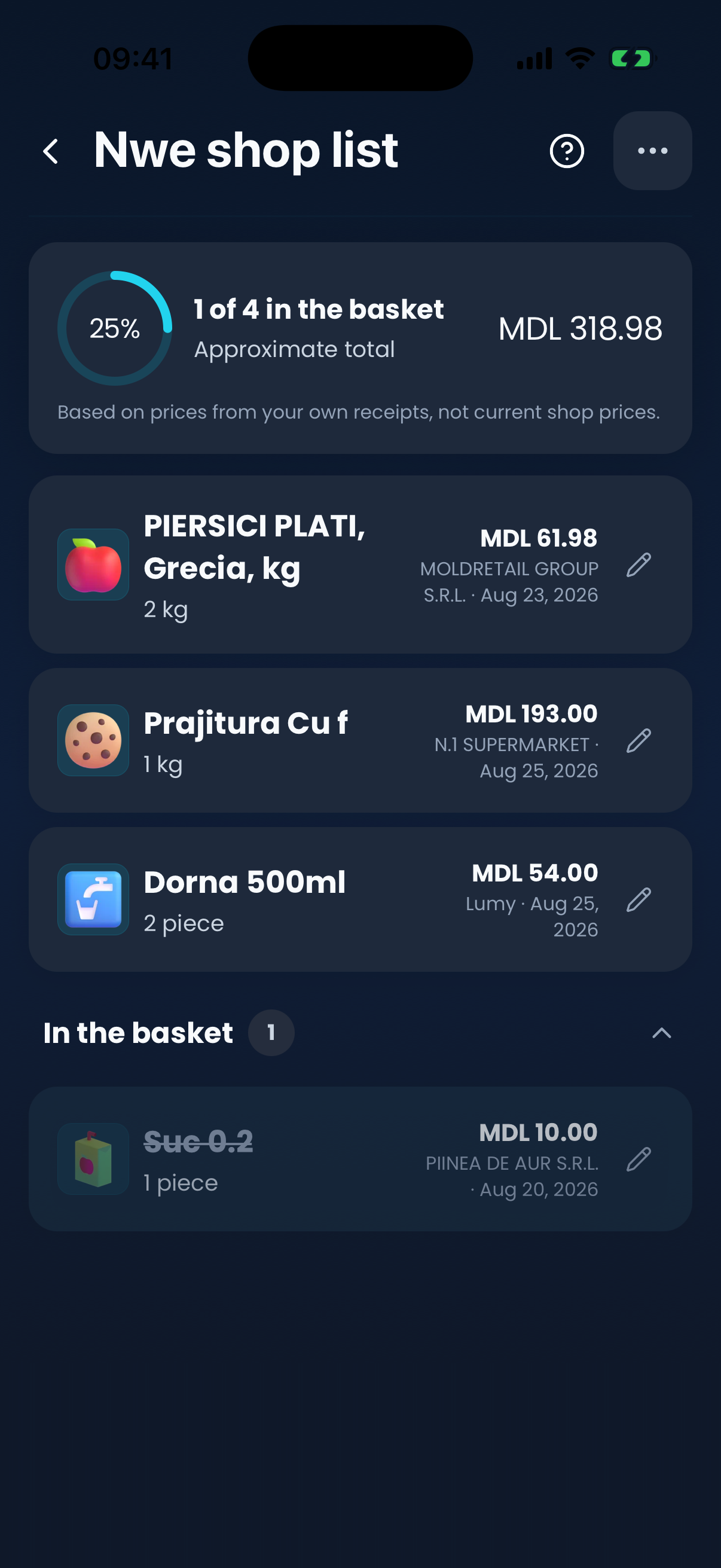
One list, the whole family
A list belongs to the family rather than to one phone. Everyone opens the same current list, and edits show up while they happen — useful when two of you are in different aisles.
- Everyone sees the same current list
- Changes appear live while you shop
- Start extra lists for a particular shop or trip
Built around what you actually buy
A normal shopping list
Remembers what to buy. Every item starts as a blank line, and the cost of the trip is a guess until the till tells you.
Lumy
Starts from the products your household already buys, prices them from your own receipts, and puts the trip back into the same budget the receipt lands in.
What you get on each plan
Free
Shopping lists, searching products on your own receipts, and their prices. The free plan allows a limited number of active lists and products per list, and warns you as you approach it.
Pro
Unlimited lists and products, more people on a list, adding products by chat, and automatic matching of new receipt lines to the products already on your lists.
Shopping list questions
Before your first list
Short answers about how the estimate works and where the prices come from.
How does Lumy estimate shopping prices?
It reuses prices from your own receipts. When a row on your list is matched to a product Lumy has seen on a receipt, it takes the price you were charged then and multiplies it by the quantity you want. Rows with no matched price are left out of the total and shown separately.
Are prices updated in real time?
No. Lumy does not connect to shops and does not read live shelf prices. Everything you see is historical — what that product cost you the last time you bought it — so treat the total as a rough guide, not a quote.
Can I share a shopping list with my family?
Yes. Lists belong to the family group, so everyone opens the same current list and edits appear while they happen. The free plan caps how many people can be on a list; Pro removes that.
What happens when Lumy has no previous price for a product?
The row still goes on the list, marked "No price yet", and is counted separately from the total rather than as zero. Once you buy that product and scan the receipt, a price becomes available for next time.
Can I add products manually?
Yes. Type a name and the row is added without a price. You can match it to a product from your receipts later, and you can edit the amount, the unit and a note on any row.
Does Lumy require a bank connection?
No. Lumy has no bank connection at all. Shopping lists are built from receipts you scan and products you add yourself, and your banking credentials are never shared or stored.
Can I use Shopping Lists without scanning receipts?
Yes, as a plain shared list — you can add every product by hand. You just will not get price estimates until some of those products have appeared on a scanned receipt, because that is where the prices come from.
Download Lumy
Plan the next shop with prices you have already paid
Free to start on iPhone and Android. Scan one receipt and your first list can price itself.


Keep exploring Lumy