Plan your family
budget with Lumy.
Set monthly limits, keep everyday spending up to date, scan receipts and see what you can safely spend — without connecting your bank account.


Plan, track, stay on budget
A household budget only works if all three happen. Lumy makes each one take seconds instead of an evening.
Plan
Plan your budget
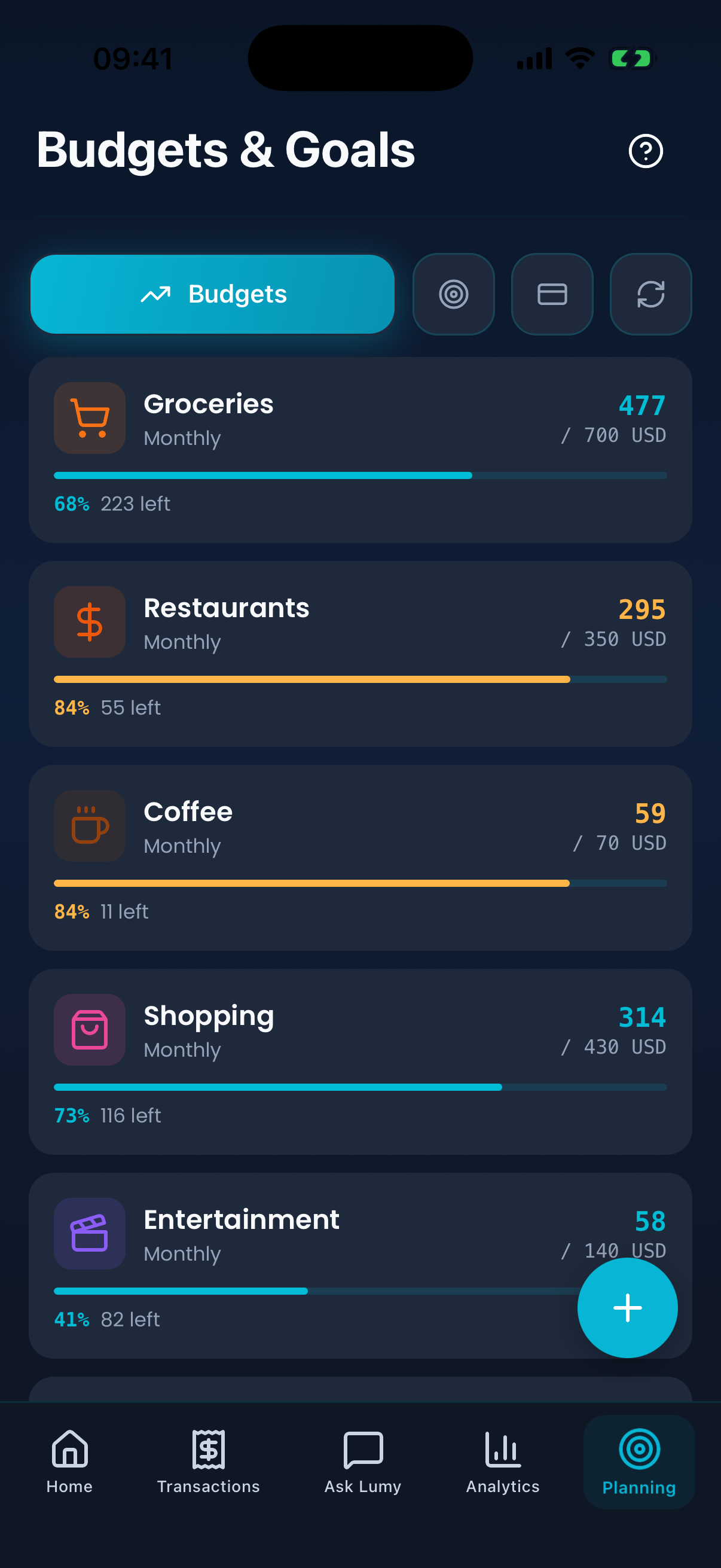
Set a budget for the month and a limit for each category — groceries, transport, bills, whatever your household actually spends on.
Track
Track spending
Add an expense by chat, by voice or from a receipt photo. It lands in the right category and updates the month straight away.
Stay on budget
Know what's left
See how far into each limit you are and how much of the month is still ahead, before you decide on the next purchase.
Plan your monthly budget in one place
Give the month a shape before it starts: one overall budget, a limit per category, and a running view of planned against spent. As expenses arrive, each category shows what is used and what is still available, so the plan stays a plan instead of turning into a guess.
Keep your budget updated as you spend
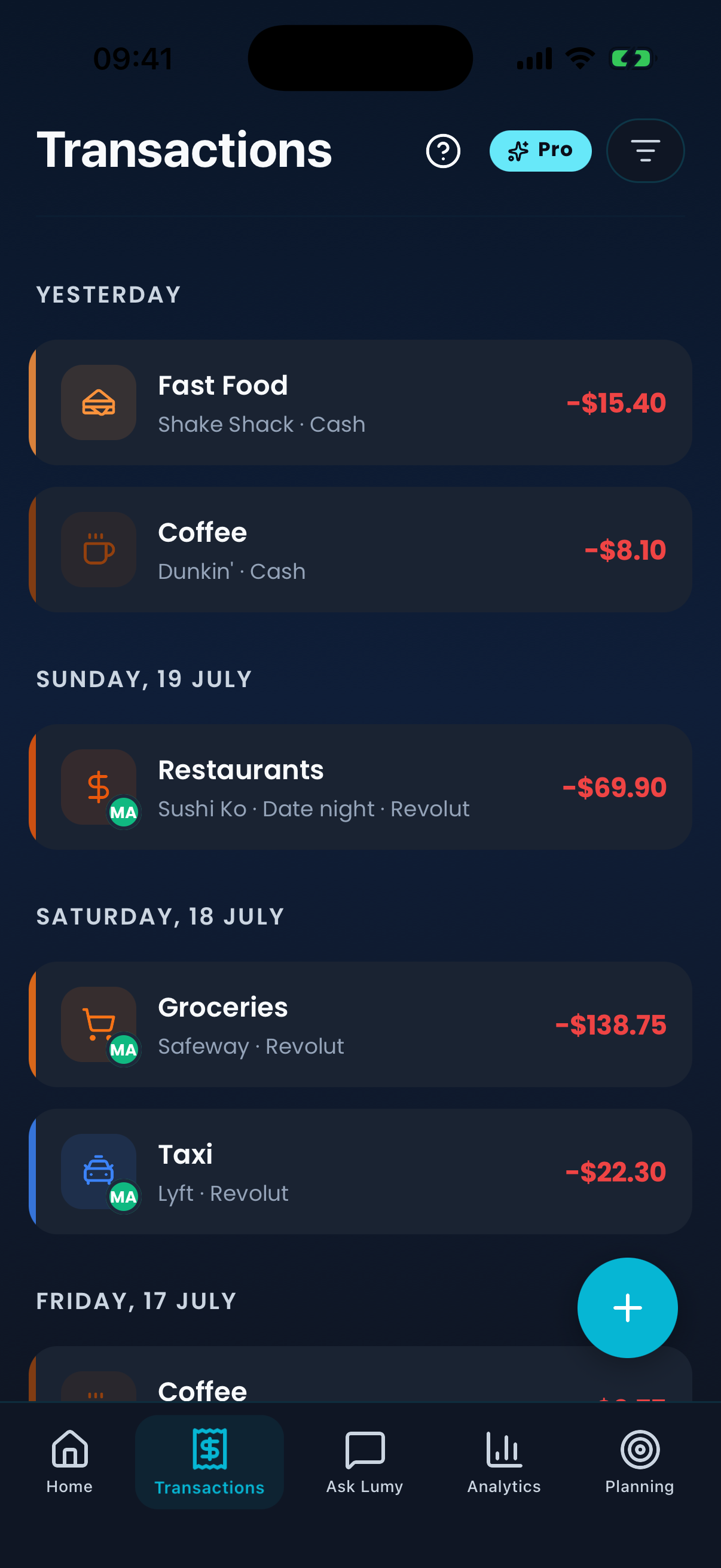
Tell Lumy "Spent €42 at Lidl" and it records the amount, picks the category and adds it to the month. Typing, speaking and scanning all end in the same place — a budget that reflects today, not last week.
Scan receipts instead of typing
Photograph the receipt and Lumy reads the total and the merchant, then files the expense in your spending history. You confirm before it is saved — the point is to skip the typing, not to take a scan on faith.
Know what you can safely spend
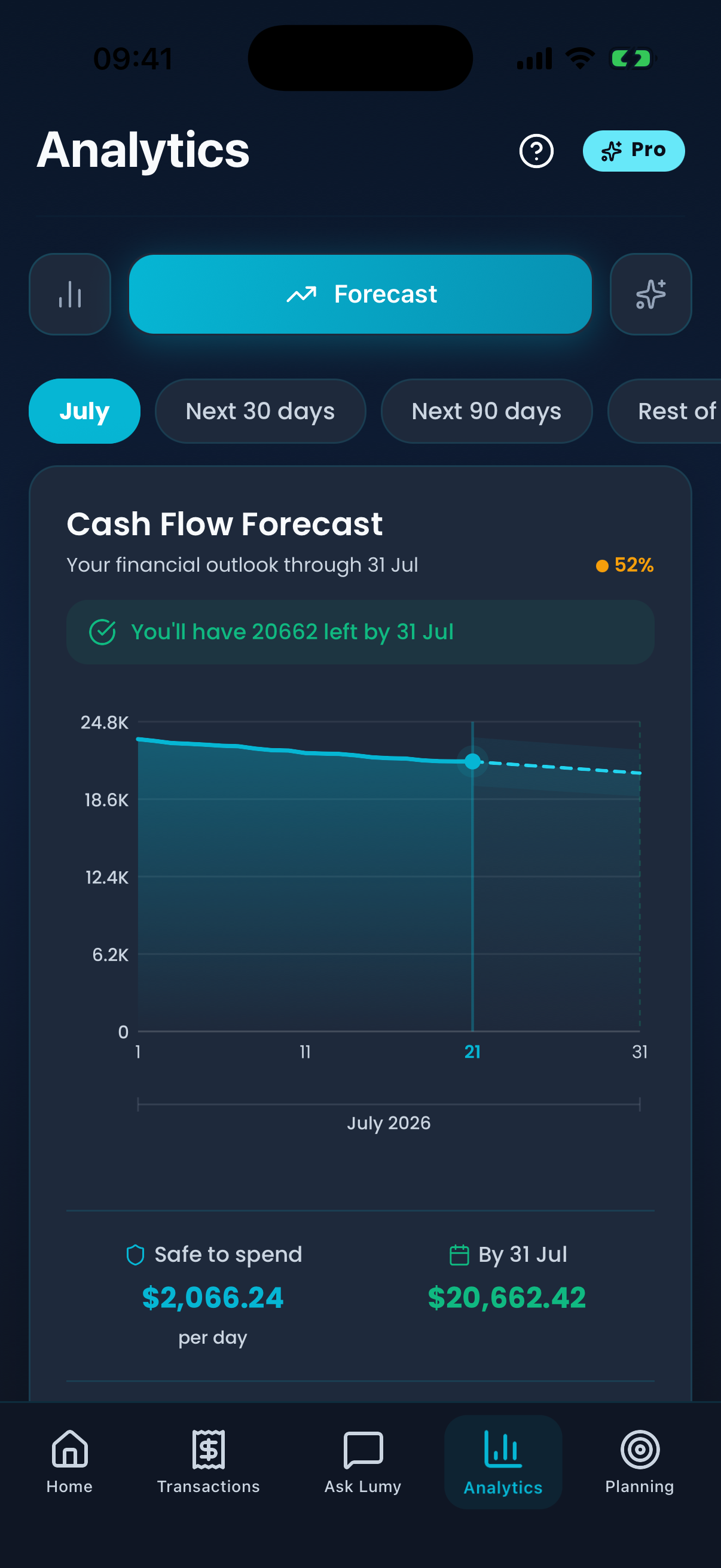
Lumy brings together what you budgeted, what you have already spent and what is still committed this month — subscriptions, instalments, upcoming bills — so you can see what is genuinely available. It is information to decide with, not a decision made for you.
One budget for the whole family
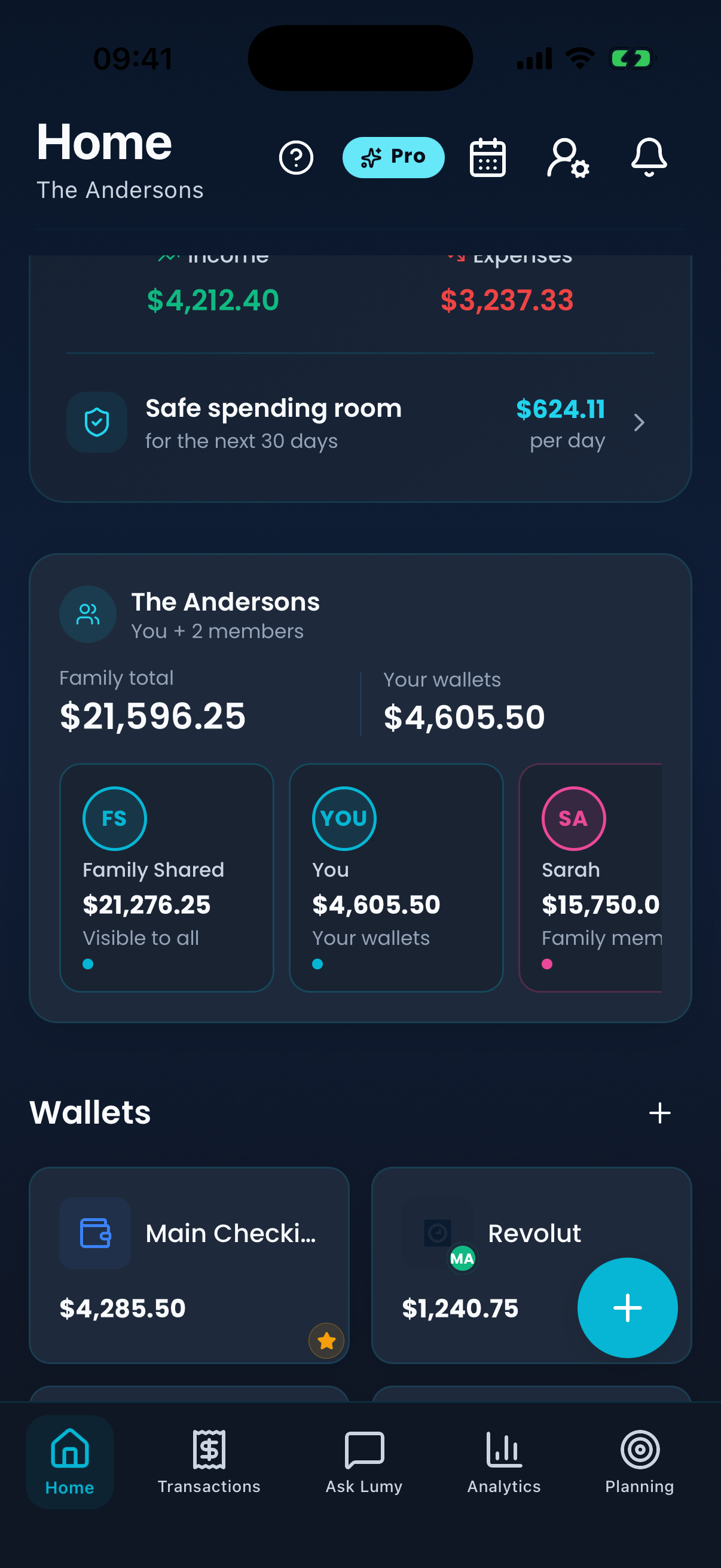
Invite the people you share money with and the household budget becomes a single picture: shared categories, shared limits, and expenses everyone in the group can see. Personal accounts can stay private — you choose what the family sees.
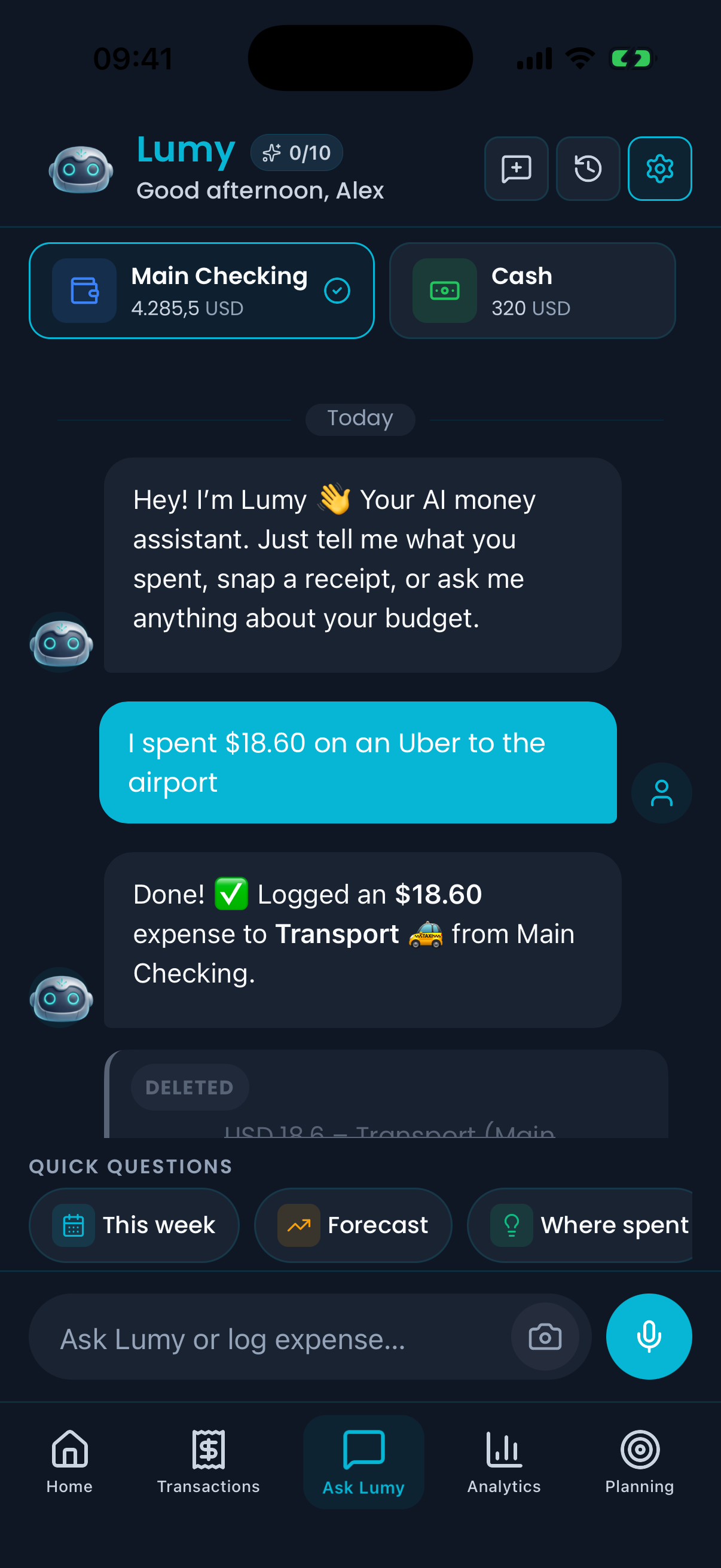
Ask Lumy about your budget
"How much did we spend on groceries this month?" "How much is left in our monthly budget?" "Which category increased the most?" Lumy answers from your own numbers — the budgets, categories and transactions in your account, not generic advice.
No bank login required
Plan a budget without handing over bank credentials
Lumy never asks for your online banking details and never connects to your accounts. You decide what goes into the budget and how it gets there — which also means the budget only contains what you meant to put in it.
Your data is stored on your device and synced to your account with row-level security. Family members see the shared budget; private accounts stay private.
Type it in
Add an expense by hand in a few taps, with the category and wallet you want.
Say it in chat
Write "€42 groceries" and Lumy logs it, categorises it and confirms.
Use your voice
Tap the mic and say the expense out loud when your hands are full.
Scan a receipt
Photograph the receipt and let Lumy pull out the total and the merchant.
The rest of the budgeting toolkit
The parts of a household budget that are easy to forget until they arrive.
Forecast
See the month ahead
Recurring payments and upcoming bills are projected forward, so a tight week is visible before it arrives.
Savings goals
Budget for what's next
Put a target on a holiday, a deposit or an emergency fund and follow it alongside the monthly budget.
Subscriptions
Keep fixed costs visible
Streaming, phone plans and instalments stay in one list with their due dates, instead of surprising the month.
Reports
See where the month went
Categories, totals and trends turn a month of small purchases into something you can actually read.
Categories
Budget in your own words
Adjust the categories until they match how your household really spends, then set a limit on each one.
Multi-currency
Plan across currencies
Choose a main currency and let Lumy convert as it goes — useful when a household earns or spends in more than one.
Budget planning questions
Before you plan your first month
Short answers to what people ask most about using Lumy as a budget planner.
What is a budget planner?
A budget planner is a tool for deciding what you intend to spend before the month starts, and then checking reality against that plan. It usually means a total for the month, a limit per category, and a clear view of how much of each limit is left.
Is Lumy a family budget planner?
Yes. You can plan on your own, or create a family group and share the household budget with the people you actually spend with. Shared categories and limits are visible to the group, while personal accounts can stay private.
Can I use Lumy without connecting my bank?
Yes — that is the normal way to use it. Lumy has no bank connection at all. Expenses are added manually, in chat, by voice or by scanning a receipt, so your banking credentials are never shared or stored.
Can couples share a budget in Lumy?
Yes. Create a family group, invite your partner with a code, and you both see the same budget, categories and shared expenses. Each of you can also keep private accounts that the other does not see. Family sharing is a Pro feature.
Does Lumy track expenses?
Yes. Planning and tracking are the same app: every expense you add counts against the category limit you set, so the budget updates as the month goes on rather than being rebuilt at the end of it.
Can Lumy scan receipts?
Yes. Take a photo of a receipt and Lumy reads the amount and the merchant and turns it into an expense. Results depend on the receipt, so you confirm the details before they are saved. Receipt scanning is a Pro feature.
How does Lumy AI help with budgeting?
You can ask questions in plain language — how much went on groceries, how much of the monthly budget is left, which category grew the most — and Lumy answers from the transactions and budgets in your own account. The free plan includes 10 AI messages a month; Pro removes the limit.
Is Lumy available on iPhone and Android?
Yes. Lumy is on the App Store and Google Play, in 13 languages, and your budget syncs to your account so it follows you between devices.
What is the difference between a budget planner and an expense tracker?
An expense tracker records what already happened. A budget planner sets what you intend to spend first, then measures spending against it. Lumy does both: you plan the limits, and everything you track is counted against them.
Download Lumy
Start planning your family budget with Lumy
Free to start on iPhone and Android. Set your first monthly budget in a few minutes — no bank login, no spreadsheet.


Keep exploring Lumy