The family budget app,
finally simple.
Scan receipts. Ask the AI where your money went. See when prices creep up. Share budgets with your family. 12 languages, 47 currencies.


Everything about your money, all in one place.
Explore each feature to see how Lumy makes everyday money management clearer and easier.
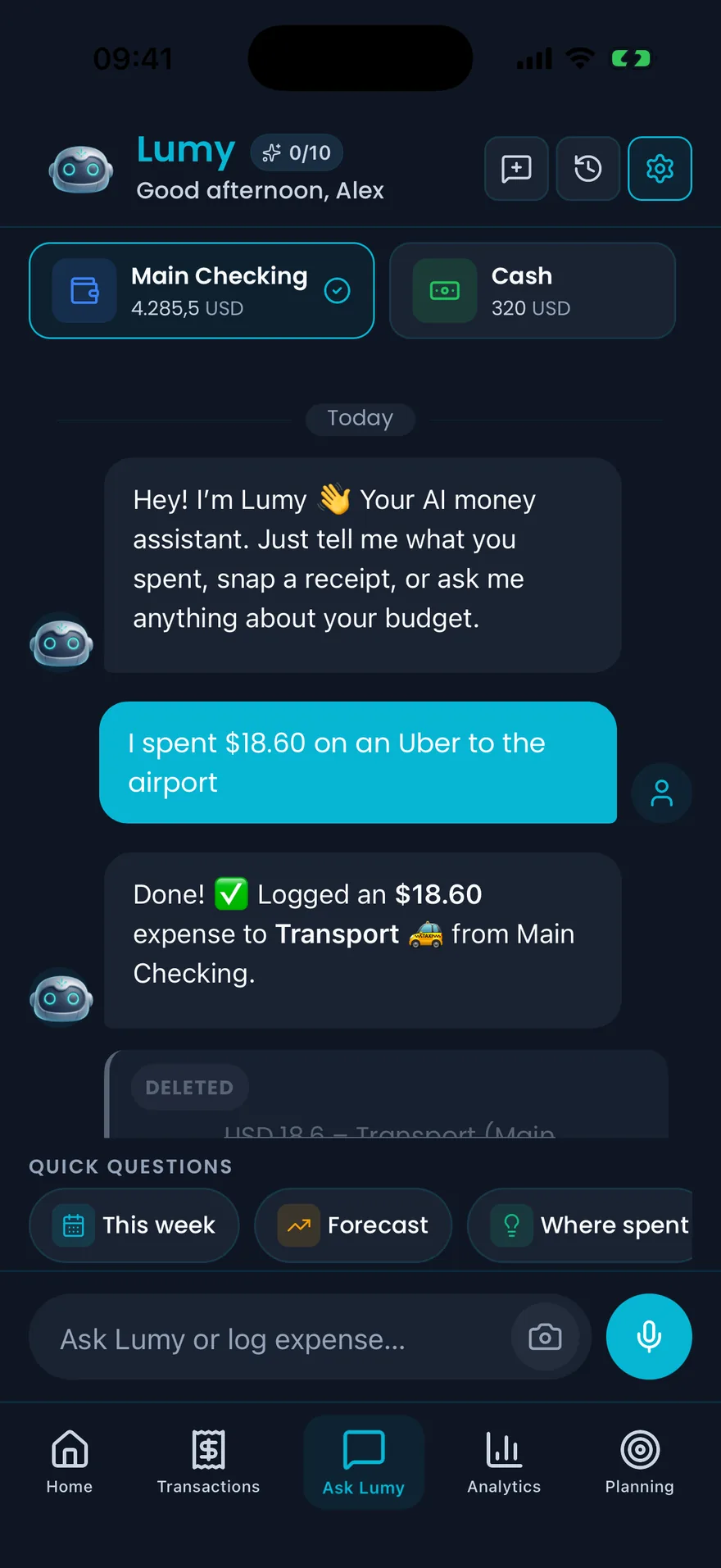
Scan receipts, log expenses and ask questions in natural language.
Shared shopping lists
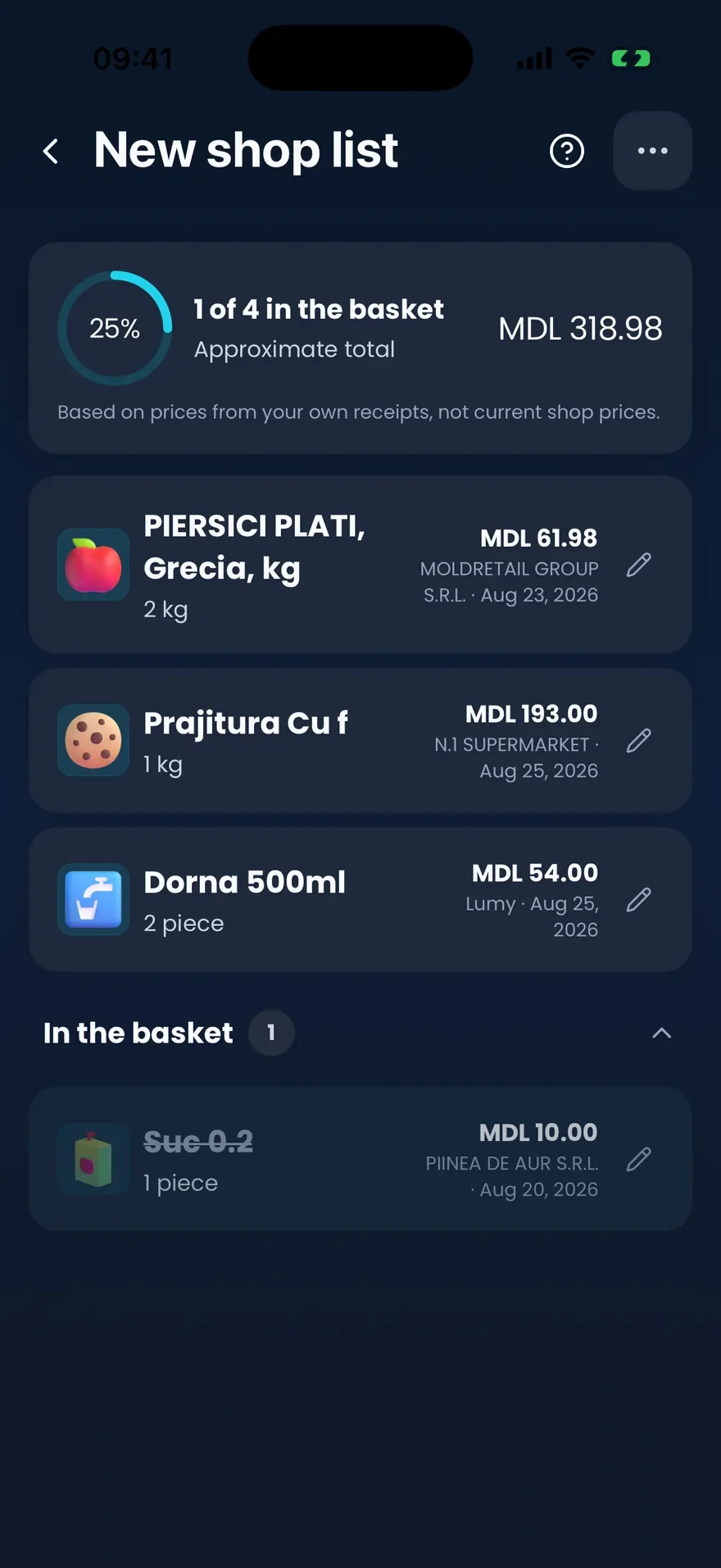
Know roughly what the shop will cost before checkout
Build a shared list from products your family has already bought. Lumy fills in what each one cost you last time and adds up an approximate total — then the next receipt keeps that history current.
- Add products straight from your own receipts
- Prices come from what you actually paid
- One list the whole family edits together
- Tick items into the basket as you shop
Free & Pro
Compare what Pro unlocks.
Track your money for free, with 10 AI requests a month. Pro removes the limit, scans up to 5 receipts at once, lets you create a family group and adds Opportunities.

Get Started Free
Monthly and yearly Pro plans are available. The exact price and subscription terms for your country appear in the app before purchase.


Free
Everything you need to track your spending.
Included
- Expense tracking
- Budget planning
- Savings goals
- Subscriptions & loans tracker
- Reports & charts
- Offline-first — works without a connection
- AI chat, voice & photo — 10 requests/month
Not included in Free
Pro
3-day Pro trial available in the app
Everything in Free, plus:
- Unlimited AI financial assistant
- Unlimited natural language & voice logging
- Family sharing — invite with a code; members don't need Pro
- Unlimited receipt scanning — up to 5 at once
- Opportunities — spot overpayments and spending increases
- Multi-currency — 47 currencies, converted automatically
- Smart insights, anomaly detection & predictions
Cancel anytime. Billed through the App Store or Google Play.
Common questions
Got questions?
Everything you need to know before you start. Still have questions? Reach out.
Does the AI actually use my real financial data?
Yes. Lumy reads your actual transactions, budgets, and goals before responding. Every answer is based on what's in your account — not generic advice.
Can I record a transaction by typing or speaking?
Yes. Type "I spent €42 on groceries" and Lumy logs it, categorizes it, and confirms. Or tap the mic and say it out loud — same result. On Free, each message uses one of your 10 AI requests a month; Pro has no limit.
How does receipt scanning work?
Tap the camera icon in chat and add a photo of a paper receipt or a screenshot of an e-receipt. Lumy reads the amount and merchant and saves the transaction straight away; open it afterwards to correct anything the scan misread. On Free, each receipt photo uses one of your 10 AI requests a month; Pro removes the limit and takes up to 5 receipts at once.
What are Opportunities?
With Pro, every scanned receipt feeds a personal price history. Lumy spots when a product you buy regularly creeps up in price, surfaces anomalies right after a scan, and lets you compare prices across stores you actually shop at. No cross-user data — your prices, your history.
Does Lumy connect to my bank automatically?
No. Lumy is a manual tracking app — you log transactions yourself. Your banking credentials are never shared or stored.
Does it work without an internet connection?
Yes. Lumy stores data locally on your device. Log transactions and check reports offline — everything syncs when you reconnect.
Can I share Lumy with my family?
Yes. Create a family group and invite with a code. Members share the dashboard and budgets, or keep private accounts only they can see. Only the person who creates the group needs Pro; the people they invite don't need a subscription of their own.
What currencies does Lumy support?
A wide range. Set your preferred currency in settings — amounts convert and display automatically across the app.
Is my data private and secure?
Your data is stored on-device and synced to a cloud database with row-level security. Only your account can access your data.
Where are my chat messages and receipt photos stored?
On your device. Your AI chat history is saved locally, and receipt photos are stored locally too — they stay on your phone.
Can I export my financial data?
Yes. Lumy includes a data export option in Settings so you can download your transaction history. You can also import data if you're switching from another app.
Is Lumy free?
Yes. Tracking, budgets, goals and the AI assistant are free, with 10 AI requests a month: a typed message, a voice message or a receipt photo each uses one. Pro removes the limit, scans up to 5 receipts at once, lets you create a family group and adds Opportunities. A 3-day Pro trial is available in the app on iPhone and Android, and prices are shown in the App Store and Google Play.
Download from desktop
Scan once. Start tracking on your phone.
On a computer? Point your phone camera at the code and open Lumy directly in the right store.